Social Trader Tools Alternative: An Honest Comparison
Trepeat and Social Trader Tools solve the same problem. A fair side-by-side on pricing, what the premium actually buys, and which of the two suits how you trade.
Updated 17 Oct 2026 · 5 min read
If you're shopping for an alternative to Social Trader Tools (people also type it as Social Trader Tool or Social Traders Tools), Trepeat is for one trader repeating their own trades across accounts they own: one MetaTrader or cTrader source account, several follower accounts, and every open, close and partial close repeated across them from the cloud, with no VPS, no EA, no always-on PC. It is not one of the social trading tools that connect your account to another person's trading; if following somebody else is what you're looking for, trade copier vs copy trading vs signals draws the line between the two.
| Compared | Trepeat | Social Trader Tools |
|---|---|---|
| Platforms | MetaTrader 4, MetaTrader 5 and cTrader, copied in any direction. | Check their site. This guide names only their MT4 bridge. |
| Account types | Currently demo accounts only: MetaTrader demo servers and cTrader demo accounts. A live account is refused at connection. | Check their site. |
| Billing | $15 per account per month, or $165 a year, tax included. Every connected account counts, the source account too: $30 for 2, $75 for 5, $150 for 10 and $300 for 20 a month. Every feature, journal and alerts included, and unlimited repeaters. | Published: $20 for 2, $60 for 5, $120 for 10 and $220 for 20 a month, the last on their top tier. |
| Trial | Try every feature free for 1 week on up to 3 cTrader accounts. MT4 and MT5 connect as soon as you subscribe. | Check their site. |
Trepeat has no affiliation with Social Trader Tools. Their figures come from their published pricing page and were accurate when this page was written; prices in this category move, so check both sites. Both products count every connected account toward what you pay for, source included, so one source plus four followers is five accounts, not four.
Every copier we have compared, in one table: compare trade copiers.
See it work
One trade, copied to two follower accounts
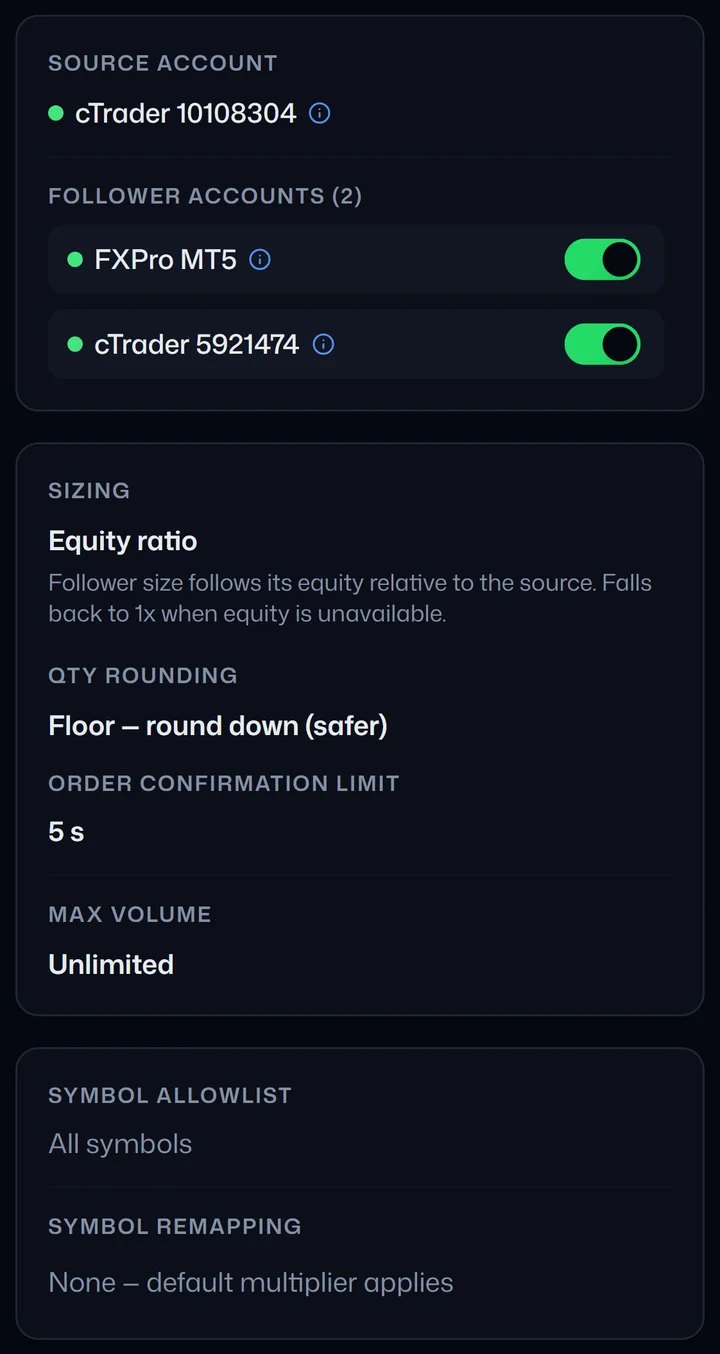
1. One source account, two follower accounts. The repeater's sizing rule gives each follower its own size, so the two do not trade the same lot. 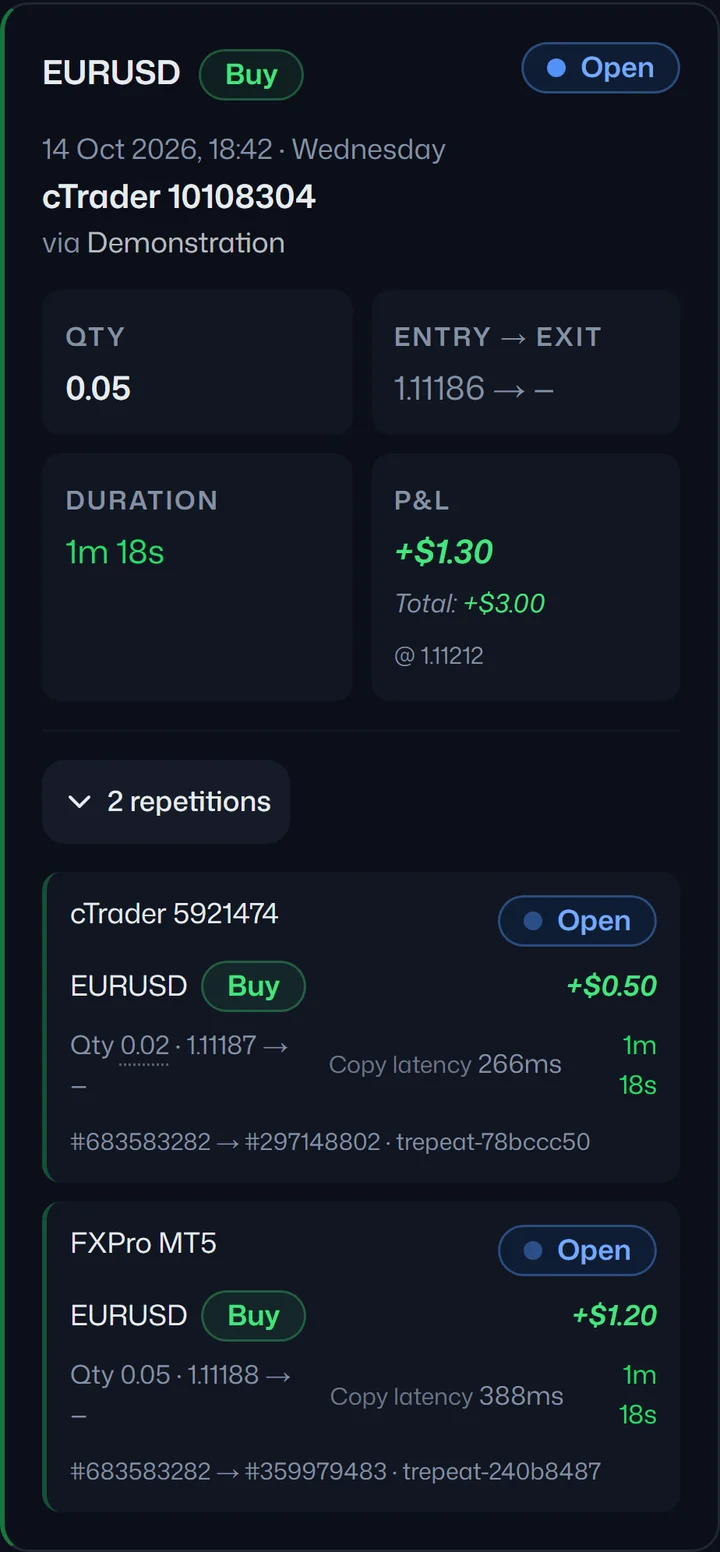
2. The entry. You place a trade on the source account. It appears on both follower accounts, each at its own size. 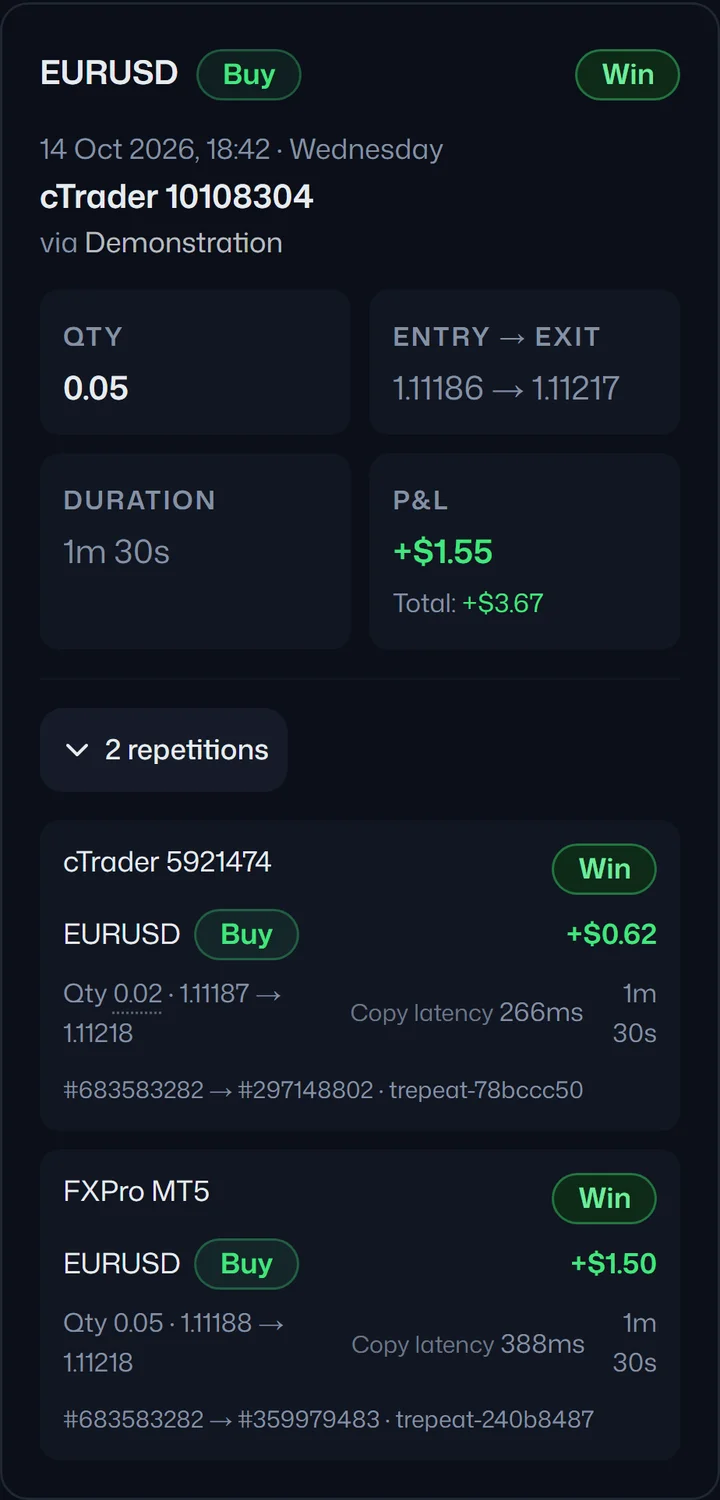
3. The close. You close the trade on the source account. Both copies close with it. 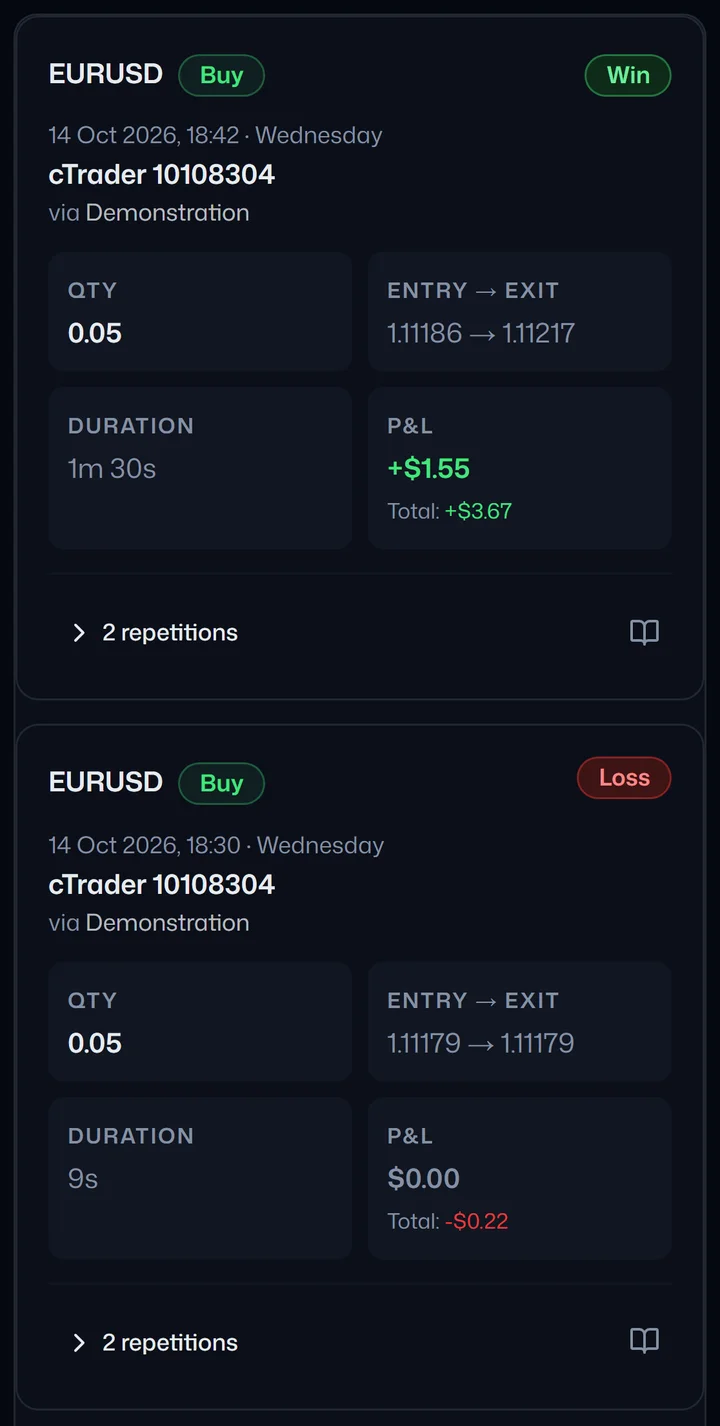
4. The record. The Trades page keeps every run, wins and losses alike, and each one opens to show its copies, their sizes and copy times.
One real run on demo accounts. Sizes and times are from that run and are not a promise about yours.
Why Trepeat is the better fit for your own accounts
Both products are cloud-hosted, so neither leaves you renting a VPS. The background on that trade-off is in cloud vs local trade copiers. The difference is in what the copier does once your accounts are connected:
- Per-repeater configuration: a repeater links one source account to one or more followers and carries its own sizing (fixed multiplier or equity ratio), symbol allowlist and symbol remapping, with a pause switch for each follower. To set two followers off the same source up differently, put them in separate repeaters, which matters when the accounts aren't the same size. See position sizing when copying trades.
- Three platforms, any direction: MetaTrader 4, MetaTrader 5 and cTrader, with a cTrader source driving MetaTrader followers or the reverse.
- Manual trades on a follower are off limits: Trepeat stamps every order it places, and its automatic closes only ever touch those copies. Flatten closes the source trade and every copy of it. Trades Trepeat isn't copying are never touched, so you can trade an account by hand while it is also a follower. If you run more than one strategy on the same account, this is the bullet that matters most on this page.
- A sick follower steps aside on its own: an account that disconnects or errors is paused automatically while the rest of the repeater carries on. Once it reconnects, unpause it in the repeater's settings (or press Run if the repeater stopped); if the source drops, the repeater stops. The alternative is discovering that one bad connection quietly stopped everything.
- Live P&L per repeater and per account: one dashboard holds every connected account: balance, equity, open positions and their value right now, priced continuously while the market is open rather than assembled from closed trades after the fact.
- Alerts when a copy doesn't land: it names what the broker actually reported. A missed copy shows in your alerts within seconds, and is emailed if it keeps failing, which is a different problem from one you find at the end of the week.
- One action closes everything: on a Running repeater, closing the source position closes every active follower's copy, which is the half of the job people underestimate until an exit goes badly.
- The history says who closed what: each close is recorded as repeated, done by hand in the terminal, or a Flatten. When you reconcile a week you are reading a record rather than reconstructing one from memory.
- A current-generation interface: dark, responsive, quick to move around, and the views you set up live in the URL so a screen you like is a link you can keep. Subjective, and you'll form your own view within a minute of opening it.
For evaluation traders the demo-only scope reads the other way round. Most prop firm evaluations and funded accounts are issued on demo accounts: a MetaTrader demo server, or a cTrader demo account where the firm offers one, so Trepeat fits that use case exactly rather than tolerating it. Running multiple evaluations at once covers what that actually looks like day to day.
Where Social Trader Tools fits better
They've been at this far longer than we have, with an established reputation and plenty of independent discussion you can go and read. For a tool that holds broker credentials, that history counts for something, and a long-lived product has had its edges worn smooth by the people who hit them first. They are the better choice in four cases:
- You copy onto a live account. Trepeat currently refuses a live real-capital account at connection, so it cannot serve you, and we'd rather say so here than after you've paid.
- You publish your trades to subscribers. They have provider-side and marketplace tooling for it; Trepeat has none of that, because it is a tool for accounts you own yourself.
- Your broker is one only their bridge reaches. Their MT4 bridge approach can reach brokers that a gateway-based service doesn't cover. If your broker is off the beaten track, check their coverage before ours.
- Price decides it. They are cheaper at every count in the table, and the gap is proportionally widest at entry. That is a legitimate reason to pick them.
Whichever you pick, whether you're allowed to run a copier on a given account is set by that account's own paperwork: your broker's terms, or the rulebook of the evaluation or funded programme. Neither product reads those rules, enforces them, or can interpret them for you; is copying your own trades allowed explains which clauses are usually the relevant ones. None of this is legal advice.
Switching without copying twice
Two copiers on one follower account would place two copies of every trade. Move your accounts over in this order:
- Write down what Social Trader Tools does today: how each follower is sized, and any symbols it renames or leaves out. In Trepeat those become the repeater's sizing, symbol remapping and symbol allowlist.
- Turn Social Trader Tools off for those accounts first, so no follower gets the same trade twice. Trades Trepeat isn't copying are never touched, so close any copies Social Trader Tools left open yourself, or switch when none are open.
- Connect your accounts in Trepeat: the source account and the follower accounts.
- Create the repeater with one follower first: the source, that follower and a small size.
- Run it, and check the copy on the Trades page. Only trades opened while the repeater is Running are copied, so a position already open on the source is not.
- Add the remaining followers once that copy looks right.
Running several demo or evaluation accounts of different sizes, with symbol names that don't match across brokers, is where the per-repeater setup earns its price. Trying it is just connecting accounts: connect one source and one follower for a session and see which screen you'd rather look at while a position is open.
Start free trialFree trial on cTrader · 1 week · up to 3 accounts
MT4 and MT5 connect as soon as you subscribe.