TradersConnect Alternative: An Honest Comparison
For your own MetaTrader and cTrader demo, evaluation and funded accounts: one price per account with journal, alerts and live P&L per repeater included. How the totals really compare once analytics is counted — and where TradersConnect's ten platforms win.
Updated 3 Nov 2026 · 7 min read
If you want a TradersConnect alternative for MetaTrader or cTrader, Trepeat repeats your own trades from one source account to your other MT4, MT5 and cTrader accounts, with the journal, alerts and trade history in one price per account. You place an order on the source account and a repeater repeats it to the follower accounts you have linked to it, with the sizing, symbol and pause rules held against that relationship rather than scattered through a settings screen. It currently connects demo accounts only, and many prop firm evaluation and funded accounts run on demo accounts: that is the setup it is built for.
| Compared | Trepeat | TradersConnect |
|---|---|---|
| Platforms | MetaTrader 4, MetaTrader 5 and cTrader, copied in any direction. | TradersConnect's home page names ten platforms: MetaTrader 4, MetaTrader 5, cTrader, Match Trader, TradeLocker, DXtrade, NinjaTrader, Tradovate, ProjectX and Rithmic. |
| Account types | Currently demo accounts only: MetaTrader demo servers and cTrader demo accounts. A live account is refused at connection. | Check their site. |
| Billing | $15 per account per month, or $165 a year, tax included. Every connected account counts, the source account too: $30 for 2, $75 for 5 and $150 for 10 a month. Every feature, journal and alerts included, and unlimited repeaters. | TradersConnect is billed per connected account: its documentation lists $15 a month for one account and $10 an account from two — $20 for 2, $50 for 5 and $100 for 10. (Its pricing page calls the $10 rate Copier Standard, beside a $15 Copier Premium the documentation does not list.) Trade analytics is a separate subscription, $29.99 a month per workspace rather than per account: with it added, about $50, $80 and $130. |
| Trial | Try every feature free for 1 week on up to 3 cTrader accounts. MT4 and MT5 connect as soon as you subscribe. | No free trial, by its documentation: a subscription comes first, before you can use it. The 10-day free trial on its home page is for its futures copier. |
Trepeat has no affiliation with TradersConnect. Prices as of October 2026. Check TradersConnect's current pricing and documentation and Trepeat's pricing before you buy.
Every copier we have compared, in one table: compare trade copiers.
See it work
One trade, copied to two follower accounts
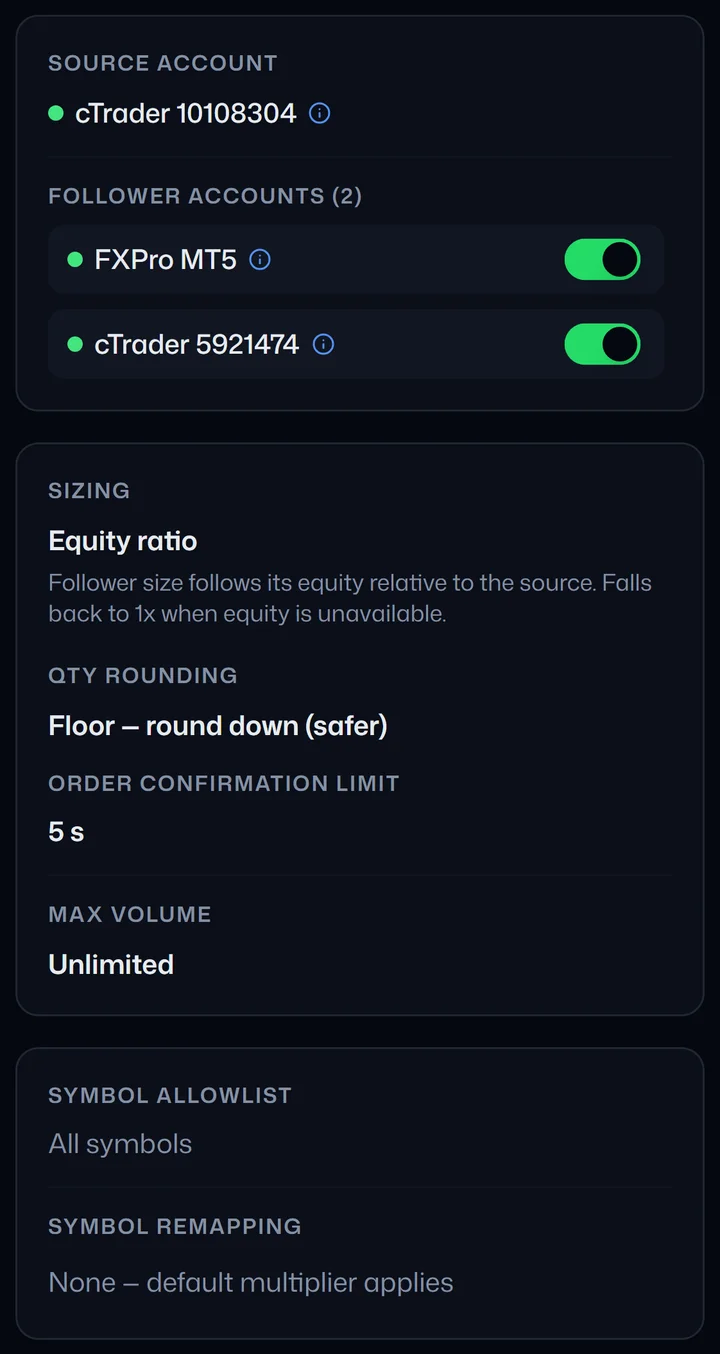
1. One source account, two follower accounts. The repeater's sizing rule gives each follower its own size, so the two do not trade the same lot. 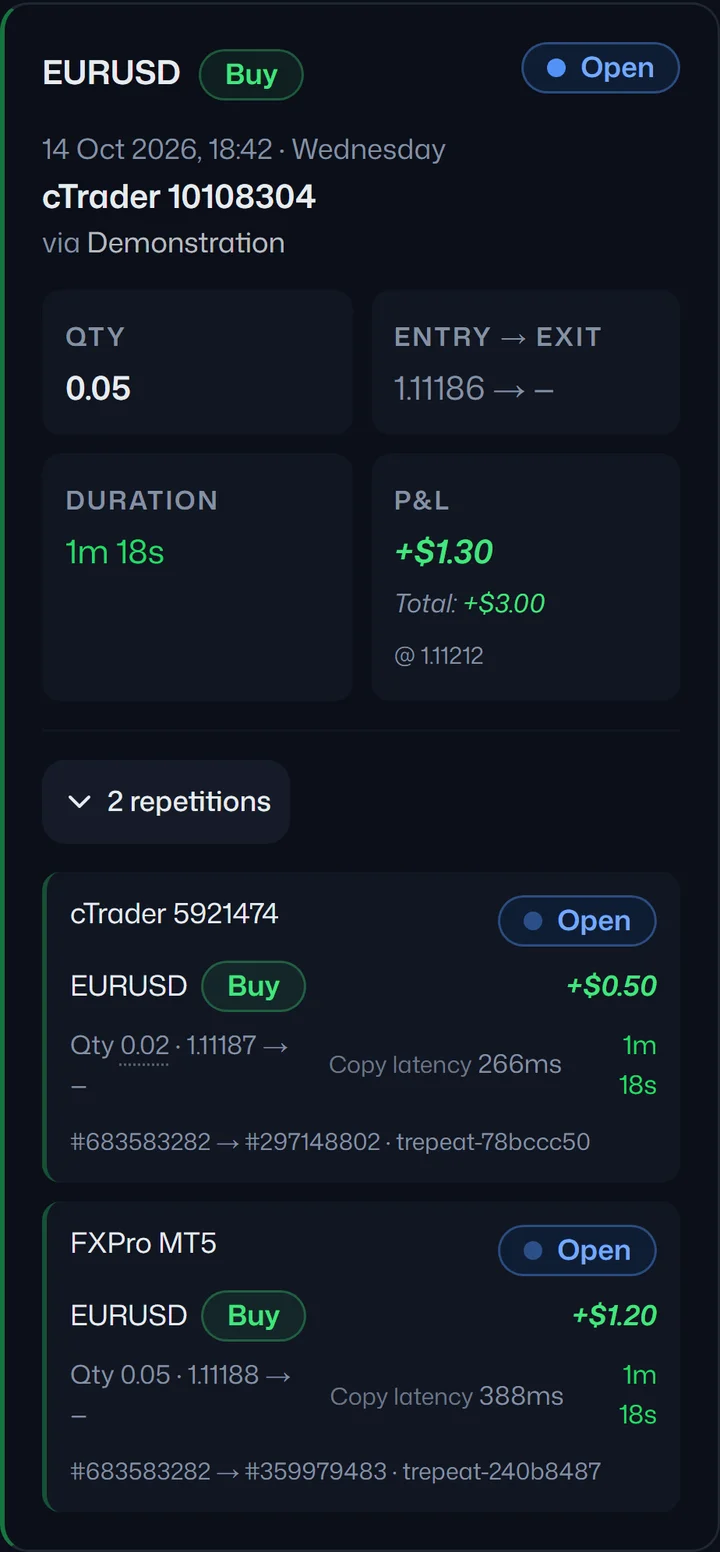
2. The entry. You place a trade on the source account. It appears on both follower accounts, each at its own size. 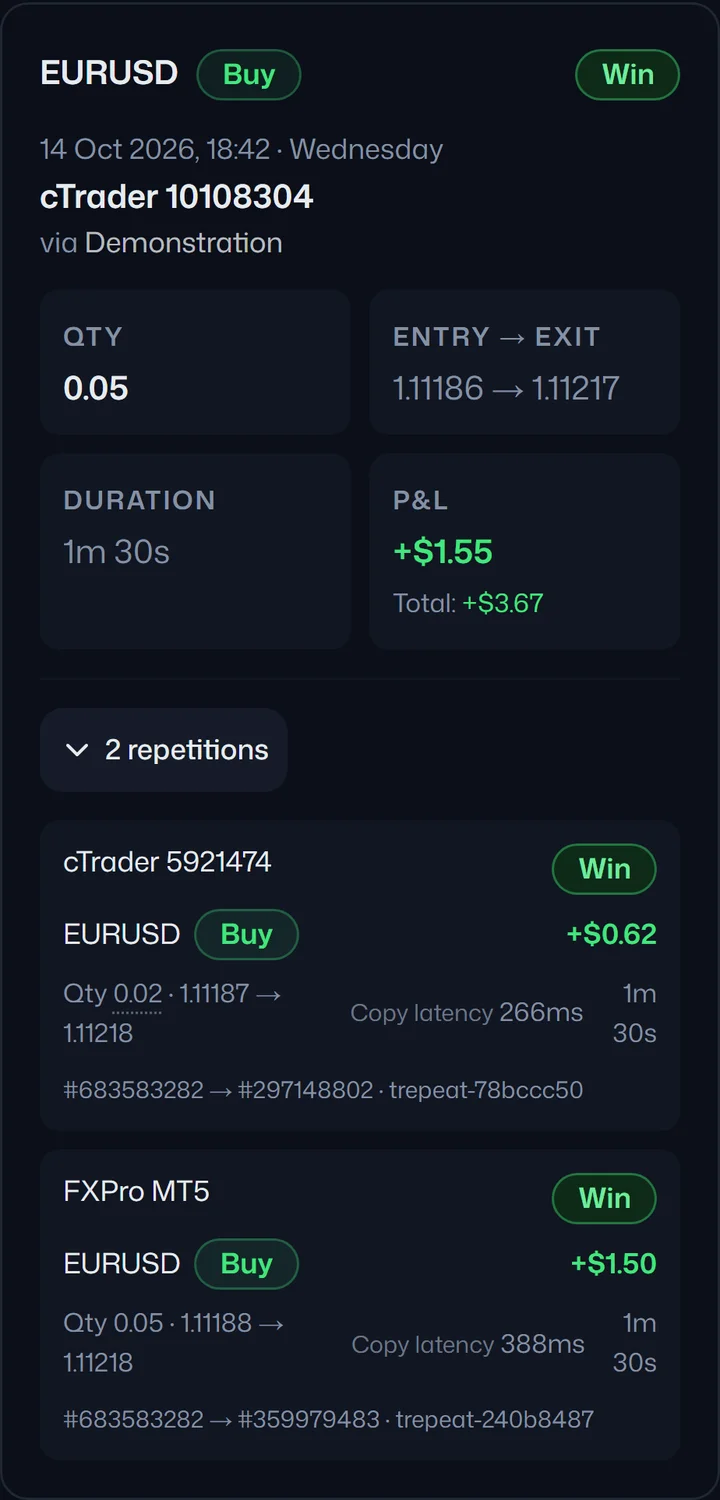
3. The close. You close the trade on the source account. Both copies close with it. 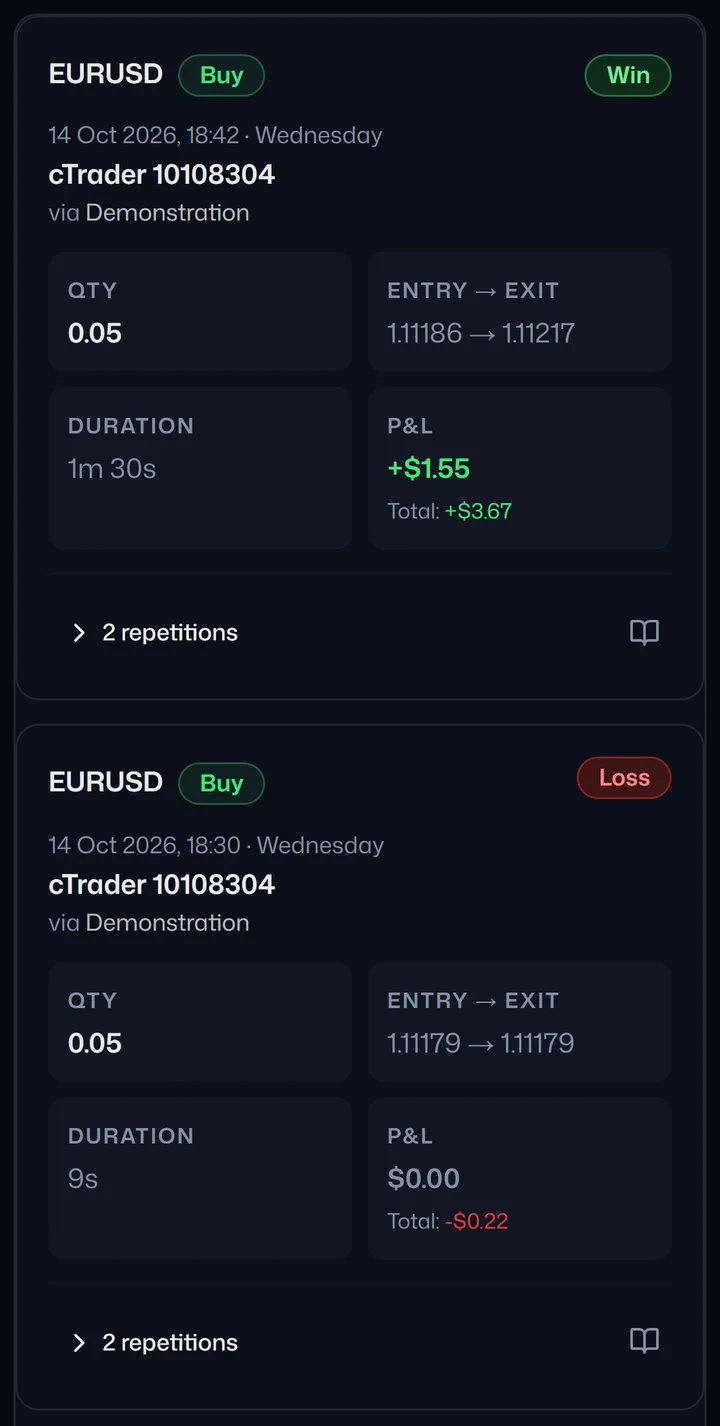
4. The record. The Trades page keeps every run, wins and losses alike, and each one opens to show its copies, their sizes and copy times.
One real run on demo accounts. Sizes and times are from that run and are not a promise about yours.
Why Trepeat is the better fit for your own accounts
These are concrete Trepeat behaviours you can check against your own setup — not claims about what TradersConnect does or does not do, which you should read in its documentation:
- You can try it before you pay — Trepeat has a free 1-week trial on up to 3 cTrader accounts. TradersConnect's documentation says it has no free trial and asks for a subscription before you can use it.
- Journal, alerts and trade history in the same subscription — the record of your trades and the information you need to investigate the copying sit in the same product as the repeater configuration, not in a separate tool.
- Three platforms, copied in either direction — MetaTrader 4, MetaTrader 5 and cTrader. On cTrader, Trepeat currently connects demo accounts, signed in with your cTrader ID so your password is never shared.
- Live P&L for each repeater and account — open positions are valued as prices update, so you can inspect what a repeater currently holds rather than reading closed-trade history and inferring the rest.
- Manual positions stay separate — Trepeat identifies the positions it opened, and its automatic closes only ever touch those. Flatten closes the source trade and every copy of it. Trades Trepeat isn't copying are never touched.
- A connection problem is contained to one follower — an unhealthy follower is paused automatically while the rest of the repeater carries on. Once it reconnects, unpause it in the repeater's settings (or press Run if the repeater stopped); if the source drops, the repeater stops.
- Disconnected accounts with open trades raise an alert — if an account loses its connected status while trades are still open, that condition is surfaced rather than left for you to notice. The alert clears when the account reconnects or the last trade closes.
- Close origins are recorded — history distinguishes a repeated close, a manual close in the broker terminal, and a close through Trepeat's Flatten button, so you have a record to consult when tracing what happened.
A repeater also carries its own Symbol allowlist and Symbol remapping. If your accounts sit at different brokers that spell the same instrument differently, or run at different sizes, those become explicit setup decisions rather than surprises after a copy. The guide to running multiple evaluations at once goes through that account-organisation problem in more detail.
The record-keeping is also why the price comparison is closer than the copier-only figures suggest. On TradersConnect the copier is the copier: its trade analytics is a separate subscription, while Trepeat includes journal, alerts and trade history in its price. Read the table on that basis and the gap closes, then reverses: Trepeat is the cheaper option at two accounts, the two are effectively level at five, and TradersConnect is cheaper at ten. Work it out for your own account count against both current pricing pages rather than taking either figure here on trust.
Where TradersConnect fits better
- You need a platform outside MetaTrader or cTrader. TradersConnect names ten platforms to our three. If your accounts live on one of the others — futures venues, DXtrade — Trepeat cannot connect them and TradersConnect is the broader tool on that axis. Further platforms are planned after cTrader; we are not putting a date on them, so judge Trepeat on what it connects today. A platform list alone does not settle a connection, so check its documentation for your exact pairing of source platform, follower platform and broker.
- You need live real-money accounts. Trepeat currently refuses a live real-money account at connection; of these two, TradersConnect is the one that serves that case. Check eligibility directly with it.
- You want copying alone, at the lowest monthly price. Plenty of people do, and for them the per-account price is the one that matters: TradersConnect's is lower at two, five and ten accounts. Confirm against its current pricing.
For TradersConnect's sizing options, symbol handling, broker compatibility and account eligibility, read its own documentation; this page does not establish whether a particular account can connect there. On Trepeat, confirm every account is a supported demo account — a MetaTrader demo server, or a cTrader demo account. An account described as funded still needs that check — the label alone does not establish the account type. And for an evaluation or funded account, read the programme's own rules on external tools and on copying between your accounts; for a personal account, read your broker's terms. Trepeat does not interpret or enforce those rules. The guide to prop firm rules on copy trading covers the clauses to look for before you connect anything.
Switching without copying twice
Two copiers on one follower account would place two copies of every trade. Move your accounts over in this order:
- Write down what TradersConnect does today: how each follower is sized, and any symbols it renames or leaves out. In Trepeat those become the repeater's sizing, symbol remapping and symbol allowlist.
- Turn TradersConnect off for those accounts first, so no follower gets the same trade twice. Trades Trepeat isn't copying are never touched, so close any copies TradersConnect left open yourself, or switch when none are open.
- Connect your accounts in Trepeat: the source account and the follower accounts.
- Create the repeater with one follower first: the source, that follower and a small size.
- Run it, and check the copy on the Trades page. Only trades opened while the repeater is Running are copied, so a position already open on the source is not.
- Add the remaining followers once that copy looks right.
If you run your own MetaTrader or cTrader demo, evaluation or funded accounts, the question worth asking is not which tool is cheaper by a few dollars a month, but which one you would rather be inside when a follower disconnects mid-trade, or when you need to work out why one account closed a position and another did not. That is the work Trepeat is designed around, and it is the part you will touch every day.
Start free trialFree trial on cTrader · 1 week · up to 3 accounts
MT4 and MT5 connect as soon as you subscribe.