Local Trade Copier Alternative: Cloud vs Local Copying
An alternative to a local, EA-based copier is really a different architecture: nothing to install and no machine to keep alive. The honest comparison.
Updated 17 Oct 2026 · 5 min read
On this page
If you're shopping for an alternative to Local Trade Copier, the real choice in front of you isn't brand versus brand. It's architectural. Local Trade Copier is a local tool: it runs as software on a Windows machine you own or rent, sitting next to MetaTrader. Trepeat is the cloud option, for one trader repeating their own trades across accounts they own: it runs on our servers with nothing installed on your side. Practically everything else (the real monthly cost, what breaks at 3am, how much of your weekend it eats) follows from that single difference.
| Compared | Trepeat | Local Trade Copier |
|---|---|---|
| Platforms | MetaTrader 4, MetaTrader 5 and cTrader, copied in any direction. | MetaTrader, as software on a Windows machine you own or rent, beside the terminal. |
| Account types | Currently demo accounts only: MetaTrader demo servers and cTrader demo accounts. A live account is refused at connection. | Check their site. |
| Billing | $15 per account per month, or $165 a year, tax included. Every connected account counts, the source account too, from 2 accounts. Every feature, journal and alerts included, and unlimited repeaters. | Its two official sites don't agree with each other. One shows a monthly subscription with tiers around €29 / €89 / €199; the other shows a one-time licence near $50 covering roughly 20 activations. |
| Trial | Try every feature free for 1 week on up to 3 cTrader accounts. MT4 and MT5 connect as soon as you subscribe. | Check their site. |
Trepeat has no affiliation with Local Trade Copier. Its two prices are very different commitments, one is rent and the other a purchase, and we're not going to pick one for you. Open the vendor's own checkout on the day you buy, confirm which entity you're paying, and check what an “activation” covers if you ever move machines.
Every copier we have compared, in one table: compare trade copiers.
See it work
One trade, copied to two follower accounts
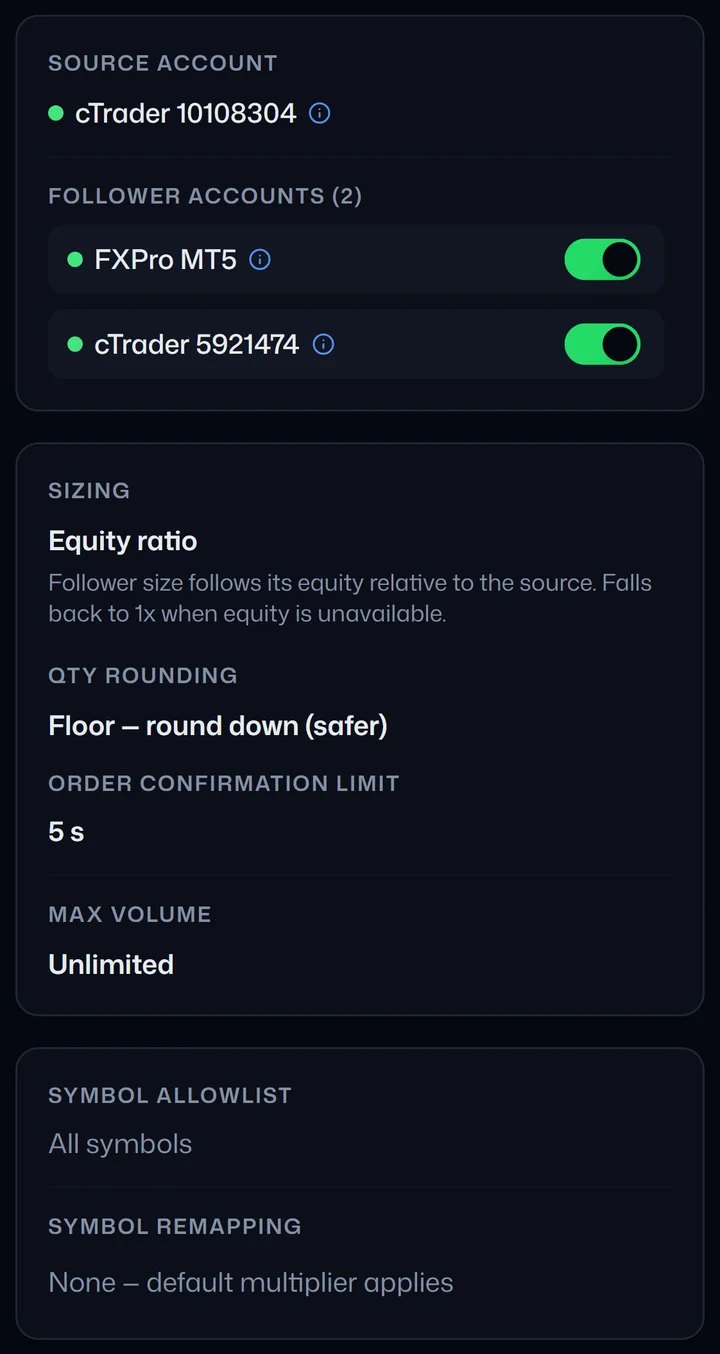
1. One source account, two follower accounts. The repeater's sizing rule gives each follower its own size, so the two do not trade the same lot. 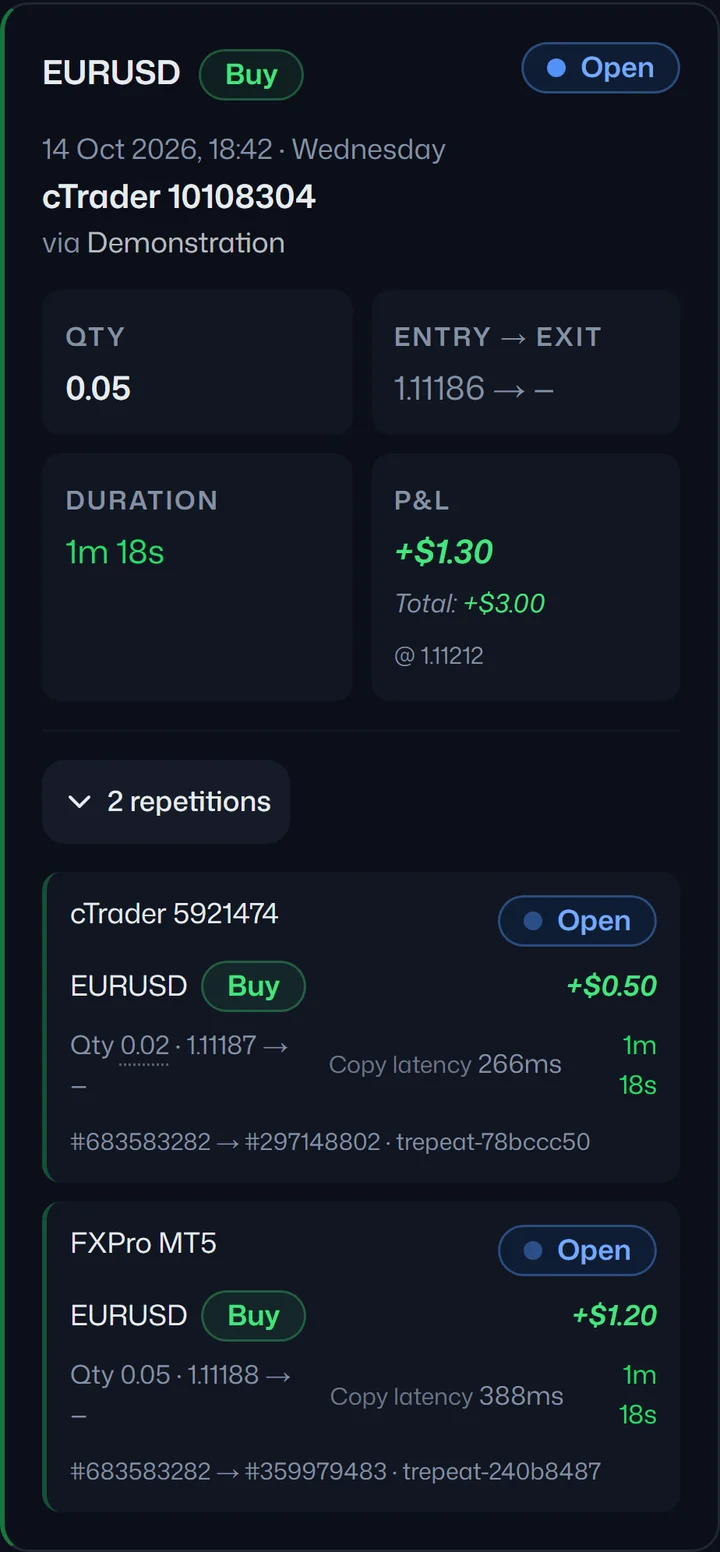
2. The entry. You place a trade on the source account. It appears on both follower accounts, each at its own size. 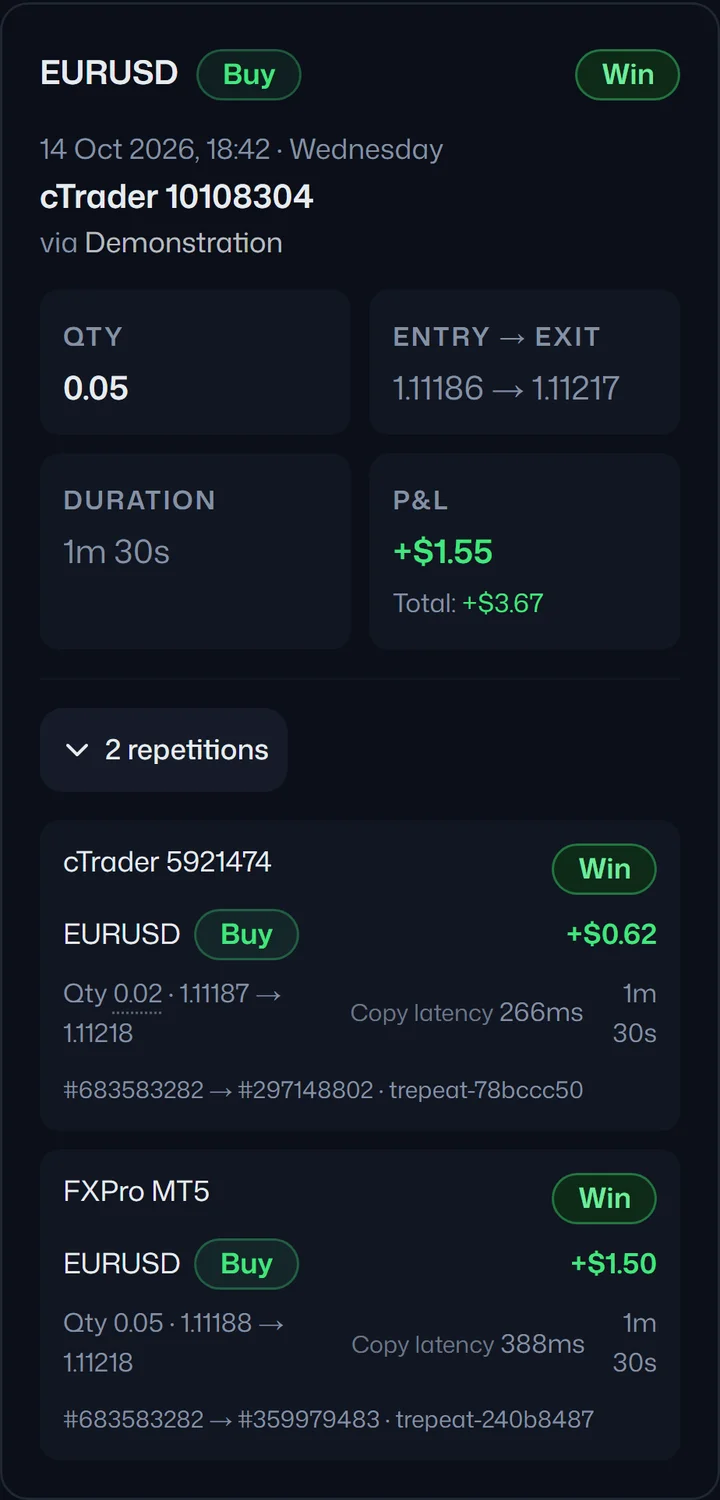
3. The close. You close the trade on the source account. Both copies close with it. 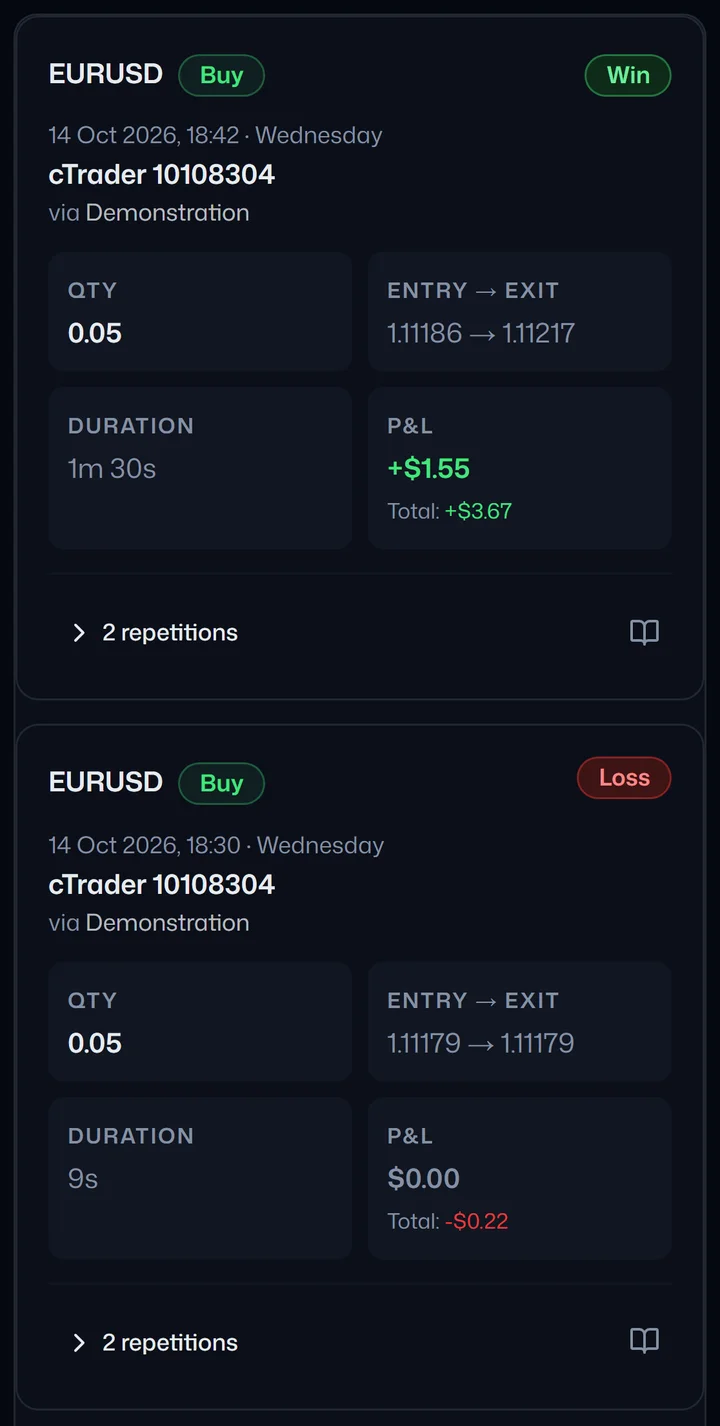
4. The record. The Trades page keeps every run, wins and losses alike, and each one opens to show its copies, their sizes and copy times.
One real run on demo accounts. Sizes and times are from that run and are not a promise about yours.
What "local" actually commits you to
A local copier is installed alongside the terminal, usually as an Expert Advisor attached to a chart. That design has one hard consequence: the software can only see your source account and place orders on your followers while that machine is powered on, logged in, online and running MetaTrader. Close the laptop and copying stops. This isn't a defect in any particular product. It's what local means, and it applies to every EA-based copier equally. If that distinction is fuzzy, trade copier vs Expert Advisor untangles the two.
The line item that never appears on the pricing page
A local copier only copies while its machine is running, so anyone who trades sessions they don't sit through ends up renting a Windows VPS. That commonly runs $10–40 a month, and it belongs in the comparison, and it's a consequence of the architecture, not an optional extra.
Run the arithmetic on your own numbers. A one-time licence near $50 plus a $20/month VPS is about $290 in year one and $240 every year after. The licence stops mattering quickly, but the hosting never does. Leave your own desktop on around the clock instead and you've swapped the bill for electricity, wear, and a machine you can't reboot when you feel like it.
One machine, one point of failure
The upkeep cost is predictable. The risk is less so, and it's the part traders discover rather than plan for:
- The machine stops: sleep, a reboot, a forced Windows update, a power cut or a dropped connection. Copying pauses until you notice and restart it.
- The terminal stops: MetaTrader hangs or logs out while the VPS looks perfectly healthy, so a green server tells you nothing about whether trades are copying.
- It fails quietly: the worst version. Nothing tells you the copier died on Tuesday; you find out from a follower account that no longer matches the source.
Why Trepeat is the better fit for your own accounts
A cloud copier removes the machine from the equation: no EA to attach, no terminal to keep open, no VPS to rent, no always-on PC. See whether you need an MT4 plugin at all for how that works with nothing installed. You connect the accounts you own, set your rules, and Trepeat repeats the trades you place on your source account onto your followers.
- Opens, closes and partial closes repeat from one source to many followers.
- MetaTrader 4, MetaTrader 5 and cTrader, copied in any direction.
- Sizing by fixed multiplier or equity ratio, plus a symbol allowlist and symbol remapping.
- Per-follower pause, so one account can sit out without stopping the rest.
- On a Running repeater, closing the source position closes every active follower's copy.
- Alerts when a copy doesn't land, naming what the broker reported.
Trepeat currently connects MetaTrader and cTrader demo accounts and refuses a live account at connect time. That reads like a limitation until you notice that prop firm evaluations and funded accounts are themselves usually issued on demo accounts, on either platform, which is the situation most people are running one source out to many followers for.
Where Local Trade Copier fits better
A fair comparison has to say this plainly, because for some traders local is the correct answer:
- Cheaper up front: if the one-time licence is the live model and you already keep a PC on, the marginal cost is close to nothing. A subscription is ongoing.
- Nobody else holds your credentials: the software runs on hardware you control and talks to a terminal you're already logged into. A cloud provider necessarily holds the credentials it signs in with: Trepeat encrypts broker credentials at rest in a vault with the keys kept separate from the data, and for MetaTrader our connection provider (MetaApi) also holds the login to keep the account connected. With cloud, the provider's security posture is what you scrutinise. Cloud vs local trade copier goes deeper on that.
- No dependency on a web service: it works with whatever broker your terminal connects to, regardless of whether some external gateway supports that broker.
- Full control: settings, parameters and the whole stack under your own roof. Some people genuinely prefer that.
Whichever you choose, one question isn't ours to answer: whether a given tool is permitted on a given account is set by your broker's terms and, for an evaluation or funded account, that programme's own rulebook. Read those before you connect anything. This page is a technical comparison, not legal advice.
Switching without copying twice
Two copiers on one follower account would place two copies of every trade. Move your accounts over in this order:
- Write down what Local Trade Copier does today: how each follower is sized, and any symbols it renames or leaves out. In Trepeat those become the repeater's sizing, symbol remapping and symbol allowlist.
- Turn Local Trade Copier off for those accounts first, so no follower gets the same trade twice. Trades Trepeat isn't copying are never touched, so close any copies Local Trade Copier left open yourself, or switch when none are open.
- Connect your accounts in Trepeat: the source account and the follower accounts.
- Create the repeater with one follower first: the source, that follower and a small size.
- Run it, and check the copy on the Trades page. Only trades opened while the repeater is Running are copied, so a position already open on the source is not.
- Add the remaining followers once that copy looks right.
If the upkeep, the VPS bill and the quiet-failure risk have started costing you more than a subscription would, connect one source and one follower and see what copying is like with no machine to keep alive.
Start free trialFree trial on cTrader · 1 week · up to 3 accounts
MT4 and MT5 connect as soon as you subscribe.